In principle, the user portal can also be used without any issues in an existing configuration.
All existing forms can be provided through the portal and are fully available to end users without restriction.
For optimal use of the portal, however, it is recommended to use additional actions and events within workflows. These provide extended functionality and offer noticeable added value for end users.
Overview of the Most Important Features
Events
Each process entry in the user portal can be assigned individual processing actions, depending on its current state and the permissions of the respective user.
If one of these actions or events is selected, the corresponding processing chain in the underlying workflow is triggered automatically.
Note: For more information about these actions, see the article User portal – Workflow events.
New events in the workflow:

| User | An event triggered externally by an authenticated user. For example, end users can trigger this through an end user portal. A user can only trigger user events for processes that belong to them. |
| Form record message | An event listener that reacts to newly sent form record messages. It can optionally be restricted to a specific message source, for example messages sent by an end user through a portal. Note: If the workflow action “Send Process Message” is used, the processing chains connected to this event listener are executed within the same workflow run, at the very end of the workflow. Sending a message within a processing chain that is itself connected to this event listener may lead to infinite loops. Once the maximum number of actions per workflow execution is reached, the workflow is terminated with an error. |
| Upload request fulfilled | An event listener that reacts to completed file requests. Caseworkers can request additional files from the user who submitted the form by creating a file request. The user must then upload the requested file or files to fulfill the request. This event listener also allows access to the data of the file request via placeholders. In addition, it provides the uploaded files: this event listener can be selected as a file source for actions connected to it. |
States
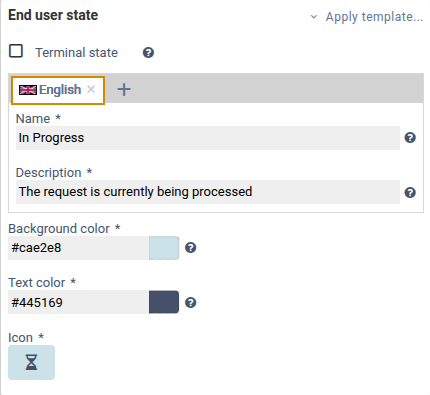
For each state, a separate entry for display in the process overview of the user portal can also be defined.
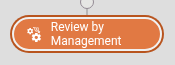
This allows states to be displayed differently depending on the audience. For example, a state in the internal caseworker inbox might be titled “Under Review by Department 2”, while the User Portal displays only “Process Under Review”.
In addition, the end user state can be customized visually by selecting:
a background color,
a text color, and
a matching icon.
This visual customization improves clarity and usability in the portal.
In addition, each state can be marked as a so-called “final state”.
If a process is in such a final state, it is specially marked in the user portal.
Note: For end user state, it is also possible to use predefined templates.
Example of an internal state:
Example of an End user state:
Actions
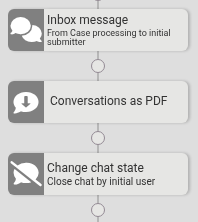
By enabling the portal functionality in formcycle, new actions become available that can be used within workflows.
Note: For more information about these events, see the article User portal – Workflow actions.
These include, among other things:
starting process-related conversations,
saving conversations, and
changing the conversation state.
These advanced functions support more efficient communication and more targeted control of process handling directly through the user portal.
Was this article helpful?
That’s Great!
Thank you for your feedback
Sorry! We couldn't be helpful
Thank you for your feedback
Feedback sent
We appreciate your effort and will try to fix the article
