Release date
- November 16th, 2026
Download links
Due to extensive database changes, it is recommended to create a backup before updating.
New features
|
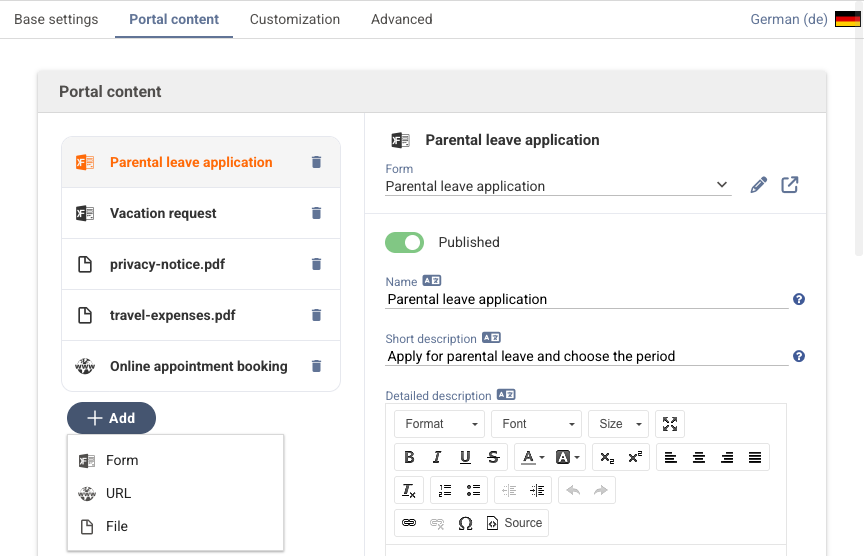
User portal: show files and links, not just forms
Besides forms, a user portal can now also offer files (for example a PDF information sheet) and URL templates (links to other pages). The Forms tab in the user portal configuration is now called Portal content. This is where you add and configure all three types of content.
Users can filter the portal contents with a new filter in the user portal. For each user portal, you decide how the content type is shown, for example as an icon.
Files and URL templates can now have translations and language-specific files. You can also export them from one system and import them into another. Developers can access portal contents through new REST API endpoints (interfaces for other systems).
|
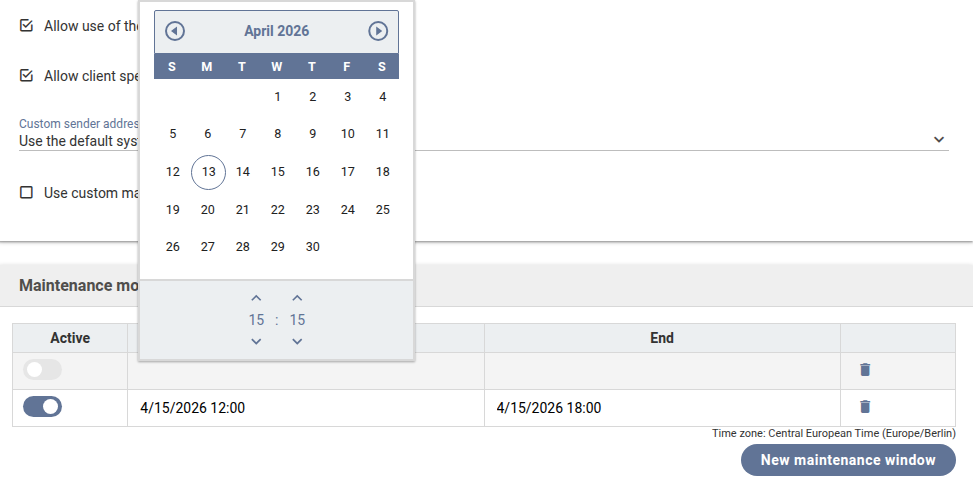
Maintenance mode for all projects of a client
You can now put all projects of a client into maintenance mode at once, for example during planned work on your system. You can set a fixed period with a start and end date, or only a start or only an end date.
|
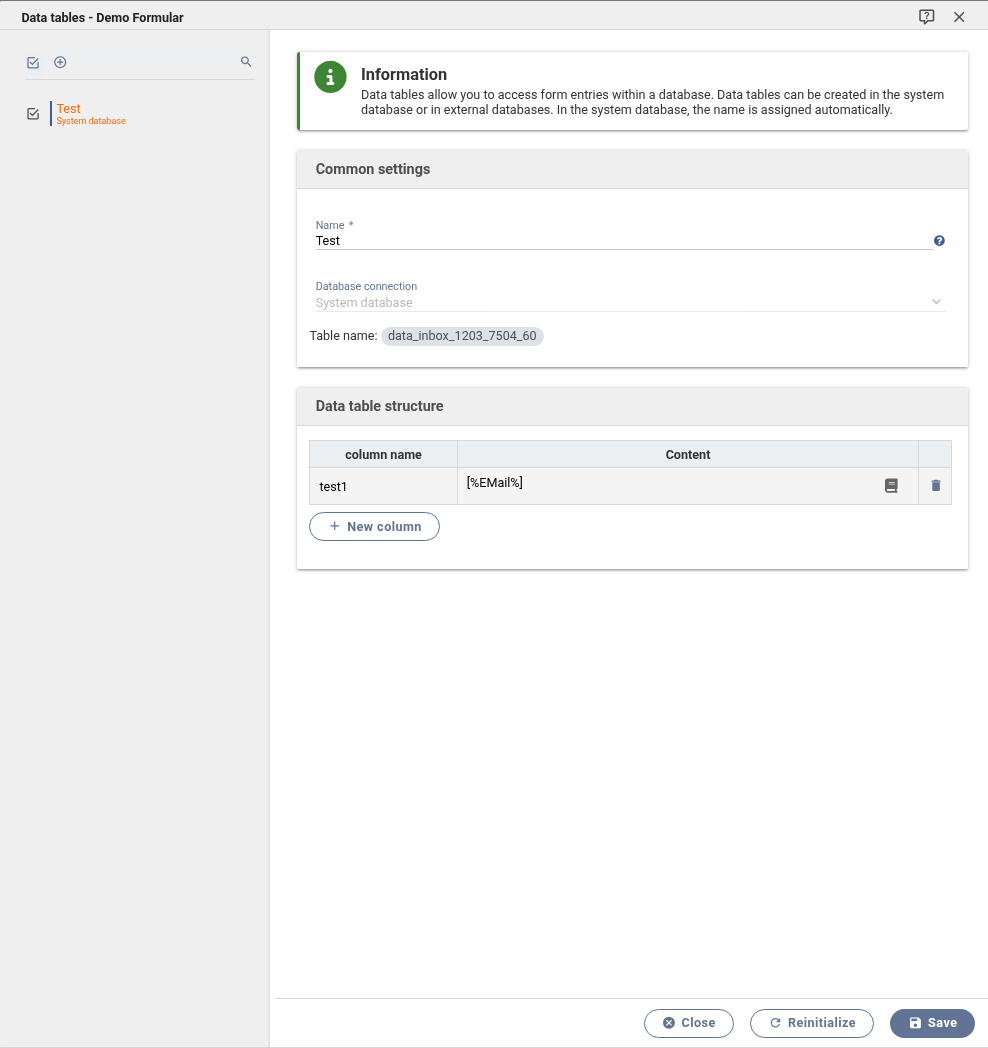
Data tables: new interface and several tables per project
The interface for data tables has been redesigned. You can now create several data tables per project. A data table can be stored in the system database or in an external database.
A new permission controls access to data tables in external databases.
|
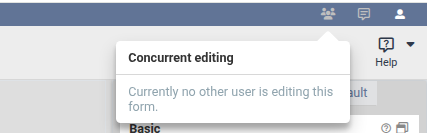
Concurrent editing
The form designer now supports user presence detection. If multiple users are working on the same form, they can see each other's presence and are warned accordingly.
Form records now also supports user presence detection. If multiple users are working on the same form record, they can see each others presence, provided they have the appropriate backend permissions. Presence is also tracked for users without these permissions, but they do not see this information.
Minor improvements
- The 'WordFill' action has a new option that creates the Word template when the workflow runs, instead of using a fixed template file.
- HTTP headers (additional information that the server sends to the browser with every response) are easier to configure for the master server and frontend servers:
- Headers set for the master server now also apply to every frontend server.
- You can override headers for each frontend server individually.
- You can add as many custom HTTP headers as you need.
- In the workflow designer, you can now hide an end user state. Hidden states are not shown to users in the user portal.
- The user portal event in the workflow has a new option to open the response page in a new browser tab.
- If a portal content has no short description or description of its own, the user portal can now show the existing description instead, for example the description of the form. You turn this on in the user portal configuration. The search in the user portal also finds content by this description.
- In the form designer, you can now give a required group a display name. This name appears in the error message when the required group has not been filled in, so users know exactly what is missing.
- You can now add a description to a certificate, for example a note about which system uses it. You can enter it when you create the certificate or later in the certificate details. This works for certificates on all levels (system, client and user).
- New form property Required fields in the form designer. It controls whether required fields, optional fields, both or neither are marked in the form. Required fields are marked with a star, optional fields with the text from the new i18n variable
optionalField(a text you can translate for each language, e.g. "– optional"). By default, only required fields are marked, as before. The note in the header and footer that explains the markers adapts to this setting:formFooterwhen required fields are marked, the new i18n variablesformFooterOptionalandformFooterBothwhen optional fields or both are marked, and no note when no fields are marked. - New form property Help text display in the form designer. It controls how the help texts of form elements are shown: as a popover (small pop-up box) next to the element (default, as before), always above or always below the field. Each form element with a help text also has the property Help text display, so you can override the form's setting for individual elements.
- Configurable passthrough of HTTP headers and URL query parameters, such as single sign-on tokens, to Generic OIDC and OAuth2 Identity Provider redirects for form logins, including automatic redirects.
Changes
Web form
- Uploaded images keep a better quality. Before, images could be compressed twice when an upload element removed the metadata (for example camera or location data) and also compressed the image. Now both happen in one step. If only the metadata is removed from a JPEG, the image itself is not changed at all.
- The image quality set in an upload element now only applies to JPEG and WebP images. Before, it also applied to PNG images, where a high quality setting created unnecessarily large files.
- Accessibility: Screen readers no longer read out the star that marks required fields (
aria-hidden="true"). They already recognize required fields via thearia-requiredattribute.
User portal
- Accessibility: Screen readers now correctly announce dialogs, sidebars and menus. While a dialog is open, the keyboard focus stays inside it and returns to its previous position when the dialog closes.
- Accessibility: Screen readers announce changes such as filtering, sorting, loading more form records and new messages.
- Accessibility: Messages, history entries and files of a form record can be reached and read using the keyboard.
- Accessibility: Elements that the portal focuses automatically are clearly highlighted again.
- Accessibility: If reduced motion is turned on in the operating system, the portal shows fewer animations and loading spinners.
Form management
- A new setting under Form overview > Versioncontrols which form version opens when a form record is opened via a link:
- Existing forms keep using the currently active form version unless you change the setting.
- New forms use the form version with which the form record was submitted. We recommend this setting.
Data tables and inbox
- The data table and the inbox table have been reworked to use placeholders.
Statistics
- The system area now shows statistics across all clients.
- Statistics are easier to use and read.
- You can now reset the History statistics of a client.
Certificate management
- Keystore uploads (JKS) now also accept PKCS12 and X.509 key files.
Backend
- For administrators: The Java setting
java.net.preferIPv4Stackis no longer set by default because it is no longer needed. If you run into problems, you can still set it via Java parameters. - For administrators: If the master server runs as a cluster (several servers working together), print jobs are now copied to every server in the cluster. To turn this off, set
print_jobs.replicationtofalsein theapplication.propertiesfile. The change takes effect after the cluster connection restarts, for example after you save the configuration in the configuration interface. - For administrators: The folder for database drivers (JDBC drivers) can now also be set with the system property or environment variable
XFC_DB_DRIVER_DIR(or XFC_DB_DRIVER_DIR_RELATIV). This lets you give each cluster server its own driver folder.
Fixes
Web form
- Animated GIFs and multi-page TIFFs uploaded via a web form now keep all frames and pages. Before, everything except the first frame or page was lost when the metadata was removed.
- Animated GIFs now keep all frames and their original colors when the upload element compresses images. Before, only the first frame remained and the colors were distorted. GIFs with up to 16 colors even turned into a black rectangle.
- Uploaded TIFF files now stay compressed. Before, they were saved uncompressed and could become much larger than the original file.
- When an upload element converts uploads to PDF, all images of a file are now kept. Before, an animated GIF or a multi-page TIFF became a one-page PDF with only the first image. Now each image gets its own PDF page.
- Animated WebP images can now be uploaded. Before, the upload failed with the error
Decode returned code VP8_STATUS_UNSUPPORTED_FEATURE. - WebP images with transparency can now be converted to PDF. Before, the conversion failed for these images and for some other high-quality WebP images.
- GIFs whose first frame covers only part of the image now keep their full size. Before, they were cut down to the size of the first frame when compressed or converted.
- Uploaded images now keep their color profile. Before, the color profile of some formats such as PNG was removed, which visibly changed the colors.
- Accessibility: In repeated elements and repeated containers, screen readers now read out the correct help texts and labels. The
aria-describedbyattribute of a form field now references the help text in the same row. Before, it referenced the ID of the original element, which does not exist in the form. When a row is copied,aria-labelledbynow only references elements of that row. Before, references to elements outside the row were changed as well, and references to elements without an ID were not updated.
Form designer
- Inserting images in the rich text editor within the form designer no longer causes an error.
User portal
- Accessibility: Clicking a button inside a form record row, for example the message icon or an action button, no longer also opens the whole row.
- The display name of the login page in the user portal configuration was reset after saving, although the user portal already showed the new name.
- The header of an opened form record now shows its subject, the same as in the list of form records, instead of the form name.
- The search for form records ignores upper and lower case again. It now also finds form records whose name, applicant, details or state contain capital letters.
Inbox
- Inbox messages without a user (for example when an inbox ID is used) no longer cause an error.
- Checking whether form records can be deleted no longer fails when many form records are involved.
Certificate management
- A new system update repairs certificates whose issuer and subject names were saved incorrectly because certain email address formats were not processed correctly.
- When a client was deleted, its keystores (storage for certificates) could be left behind. The same happened when a user was deleted. There was an error in the log, but no message in the interface. Leftover keystores are now removed automatically every night, including those from earlier deletions.
Backend
- Form exports attached to support request emails now use the form title as the file name.
- After logging out, users can now only be redirected to certain formcycle pages. This improves security.
- Changes to database drivers no longer cause errors on frontend servers.
- In a cluster, database driver files are no longer duplicated in the driver folder.
- If adding or removing a database driver fails, formcycle still keeps watching the driver folder for changes.
- Database drivers are no longer registered twice when a driver is uploaded and added to the driver folder at the same time.
- The connection to frontend servers could get stuck while reconnecting and only recovered after restarting formcycle. This has been fixed.
- Third-party libraries used by formcycle have been updated to newer versions.
For plugin developers
- New module
fc-asset-domainwith the serviceIAssetManagementServicefor exporting and importing client resources and client templates. - Events fired via the
EventBusmust be annotated with@EventDistributionto configure whether they are distributed to cluster nodes and frontend servers. Firing an event without this annotation throws anIllegalArgumentException. - New enum
ERequiredFieldDisplayand form propertyXFormPropertyEnum.REQUIRED_FIELD_DISPLAY, with the accessorsXFormProperties#getRequiredFieldDisplay()/#setRequiredFieldDisplay(...)andXItemRenderCtx#getRequiredFieldDisplay(). The form element container now has adata-xm-requiredattribute with the current required state for elements that support the required property. For a repeated element, each row.dynamic-rowmay also have this attribute once its state changes on the client.$.fn.addStar,$.fn.removeStarand$.fn.showStarrespect the new form property and add or remove the marker for optional fields (span.optional-marker). - New form property in the form designer that controls how the help texts of form elements are displayed. It can be overridden for each element. Plugins that contain themes or otherwise affect the appearance of the form should check whether they are compatible with these new settings.
Was this article helpful?
That’s Great!
Thank you for your feedback
Sorry! We couldn't be helpful
Thank you for your feedback
Feedback sent
We appreciate your effort and will try to fix the article
