8.5.0
The prompt query action allows a previously configured AI query to be executed within a workflow. The action accesses a prompt configuration created in the backend and processes its result in the subsequent workflow.
Contents
|
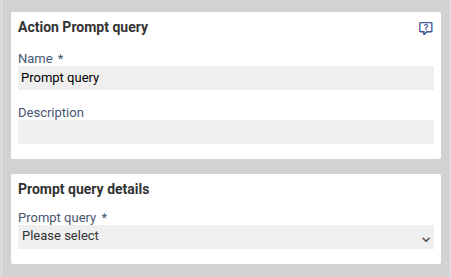
Configuration
Name
Internal label for the workflow action. The name helps maintain an overview, particularly in more complex workflows with multiple actions.
Description
Optional field for documenting the purpose of the action within the workflow. This can be used to note what task the prompt query fulfills or what data is being processed.
Prompt query
A previously created prompt configuration is selected here. All prompt queries defined in the system are available for selection.
The selected configuration determines:
- which model is used
- which inputs are processed
- in which format the response is returned
Processing of Parameters
The prompt query processes the input parameters defined in the configuration.
Values can originate from, for example:
- form fields
- workflow variables or file uploads
The parameters are automatically passed to the model upon execution.
Return Values on Successful Execution
After successful execution of the prompt query, the workflow action provides various placeholders. These contain the result generated by the model as well as information about model usage.
Response Text
[%$Prompt-Abfrage.RESULT.responseData.answer%]
Contains the generated response from the model. Depending on the configuration, this may be free text, a structured JSON response, or the result of a classification. The content corresponds exactly to the output format of the selected prompt configuration.
Token Usage (input)
[%$Prompt-Abfrage.RESULT.responseData.tokenUsage.input%]
Indicates how many tokens were processed for the input. This includes the prompt, passed parameters, and any system instructions.
Token Usage (output)
[%$Prompt-Abfrage.RESULT.responseData.tokenUsage.output%]
Shows how many tokens were used for the generated response.
Token Usage (total)
[%$Prompt-Abfrage.RESULT.responseData.tokenUsage.total%]
Contains the total number of tokens used (input + output). This value is particularly relevant for monitoring, cost control, or statistical analysis.
The return values are available immediately after the action and can be flexibly processed or stored in the subsequent workflow.
Error Values on Failed Execution
If the prompt query is not executed successfully, the workflow action provides additional error placeholders. These can be used for logging, notifications, or alternative workflow branches.
PROMPT_SERVICE_NOT_FOUND
[%$Prompt-Abfrage.ERROR.promptType%]
This error occurs when the configured prompt service cannot be found or is unavailable.
Possible causes:
- The service has not been set up correctly
- The connection or authentication to the provider is invalid
The placeholder contains the affected service type.
REQUEST_REFUSED
[%$Prompt-Abfrage.ERROR.refusalREASON%]
This error is set when the request was rejected by the AI service before a response could be generated.
Typical reasons:
- The submitted content violates guidelines
- The request is invalid or incomplete
- Security or protection mechanisms are triggered
The placeholder contains the rejection reason returned by the service.
RESPONSE_REFUSED
[%$Prompt-Abfrage.ERROR.refusalREASON%]
Set when the model refuses to generate a response. The placeholder also contains the reason provided by the service.
Notes on Further Processing
The error placeholders are also available immediately after the action and can be used to:
- trigger an alternative workflow branch
- set a status
- send an internal notification with error details
- generate error logs
This allows transparent tracking of why a prompt query did not complete successfully.
Was this article helpful?
That’s Great!
Thank you for your feedback
Sorry! We couldn't be helpful
Thank you for your feedback
Feedback sent
We appreciate your effort and will try to fix the article
