Contents
Getting started with the formcycle REST API
This guide shows how to authenticate against the formcycle REST API with a username and password (formcycle system login or LDAP) and how to use the API via the API reference or curl.
To use the REST API, make sure of the following:
In the system settings, under the menu item General, the option to enable the REST API is checked in the REST API section.
Overview
| What | Value |
|---|---|
| Base URL | https://<server>/<context-path>/api/rest/public/ |
| API reference | https://<server>/<context-path>/api/rest/public/doc/openapi.html |
| Response format | JSON |
| Request format for the Security API | application/x-www-form-urlencoded |
Opening the API reference
The API reference is available in two places:
- On your own formcycle server at the addresses listed below. This reference always matches the installed version exactly.
- At docs.formcycle.eu: Select the formcycle version you are using and open the rest-api folder.
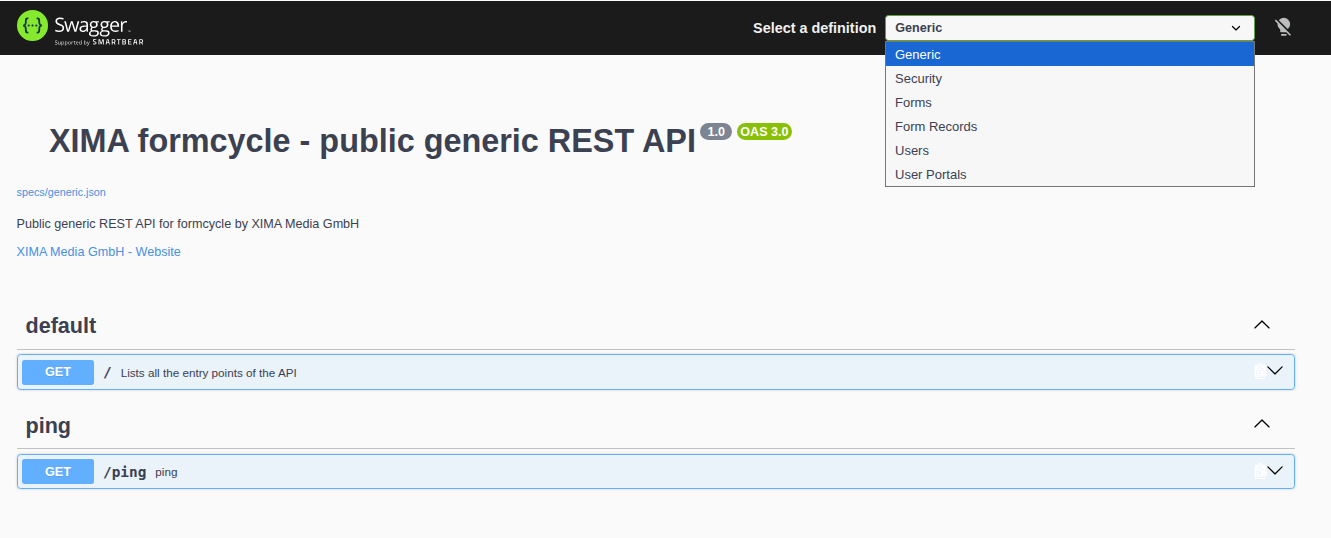
The REST API documentation is available at docs.formcycle.eu from formcycle version 8.5.6 onwards.The API is divided into several sections. In the API reference, you can switch between them using the API selection:
|
| Section | Content | API reference |
|---|---|---|
| Generic | Entry point with links to all sections, availability check (/ping) | https://<server>/<context-path>/api/rest/public/doc/openapi.html |
| Security | Authentication and token management | https://<server>/<context-path>/api/rest/public/security/doc/openapi.html |
| Forms | Forms | https://<server>/<context-path>/api/rest/public/forms/doc/openapi.html |
| Form records | Form records | https://<server>/<context-path>/api/rest/public/form-records/doc/openapi.html |
| Users | Profile of the logged-in user | https://<server>/<context-path>/api/rest/public/users/doc/openapi.html |
| User portals | User portals | https://<server>/<context-path>/api/rest/public/user-portals/doc/openapi.html |
Supported login methods
The following login services are currently supported for logging in to the REST API:
- formcycle system login
- LDAP
External login services (e.g. OAuth 2.0, OpenID Connect, or SAML-based services such as BundID) cannot currently be used to log your own applications in to the REST API.
Quick start: Get to your data in two steps
The following example shows the complete path from login to retrieving data. All protected endpoints of the API work according to this principle. Details on the individual steps (renewing tokens, MFA, error handling, etc.) follow further below.
Step 1: Request a token
An access token is requested with a username and password. form stands for the formcycle system login here (for LDAP, see Authentication).
curl -X POST "https://<server>/<context-path>/api/rest/public/security/auth/form/token" \
  -H "Content-Type: application/x-www-form-urlencoded" \
  --data-urlencode "username=<username>" \
  --data-urlencode "password=<password>"
Response (shortened):
{
  "status_type": "SUCCESS",
  "token_response": {
    "access_token": "eyJhbGciOi...",
    "refresh_token": "eyJhbGciOi...",
    "expires_in": 300
  }
}
You need the value of token_response.access_token. If multi-factor authentication is enabled for the user, status_type contains the value MFA_REQUIRED instead (see Login with multi-factor authentication).
Step 2: Use the token
The access token is sent in the Authorization header with every further request to protected endpoints. The example retrieves a list of the form records that the logged-in user has submitted:
curl -X GET "https://<server>/<context-path>/api/rest/public/form-records" \
  -H "Authorization: Bearer <access_token>" \
  -H "Accept: application/json"
All protected endpoints of the API work according to exactly this pattern (send the token in the header, evaluate the response in JSON format). The API reference shows which endpoints are available in detail.
Authentication (formcycle system login / LDAP)
All protected endpoints require an access token. This token is requested via the Security API with a username and password.
Endpoint:
POST /api/rest/public/security/auth/{clientName}/tokenThe parameters username and password are transmitted as application/x-www-form-urlencoded. A JSON body is not supported and is rejected with the status 415 Unsupported Media Type.
Determining the clientName
{clientName} is the technical name of the login service:
| Login method | clientName |
|---|---|
| formcycle system login | form |
| LDAP | UUID of the LDAP login service |
For LDAP, do not specify use ldap, but the UUID of the respective LDAP login service. Since several LDAP login services can be set up, each one has its own UUID.The UUID can be determined in two ways:
- In the user interface: In the settings of the LDAP login service, in the field Alias for callback URL (UUID). [INTERN: Check English UI label of this field]
- Via the REST API: If the LDAP login service is assigned to a user portal, the endpoint
GET /api/rest/public/user-portals/{userPortalUuid}/authenticatorsreturns all login services of the portal with theirclientName. TheuserPortalUuidis returned byGET /api/rest/public/user-portalsin the fielduuid(not to be confused with the fieldalias).
Example response from /user-portals/{userPortalUuid}/authenticators (shortened):
{
  "results": [
    {
      "clientName": "a5c24bf2-8702-4777-b586-cdb6d3e593dd",
      "displayName": "LDAP company.local",
      "renderType": "FORM_INPUT_USERNAME_PASSWORD"
    },
    {
      "clientName": "form",
      "displayName": "System login",
      "renderType": "FORM_INPUT_USERNAME_PASSWORD"
    }
  ]
}
Example: Requesting a token via curl (formcycle system login)
curl -X POST "https://<server>/<context-path>/api/rest/public/security/auth/form/token" \
  -H "Content-Type: application/x-www-form-urlencoded" \
  --data-urlencode "username=<username>" \
  --data-urlencode "password=<password>"
Example: Requesting a token via curl (LDAP)
curl -X POST "https://<server>/<context-path>/api/rest/public/security/auth/<ldap-login-service-uuid>/token" \
  -H "Content-Type: application/x-www-form-urlencoded" \
  --data-urlencode "username=<username>" \
  --data-urlencode "password=<password>"
Response
{
  "status_type": "SUCCESS",
  "token_response": {
    "access_token": "eyJhbGciOi...",
    "expires_in": 300,
    "refresh_token": "eyJhbGciOi...",
    "refresh_expires_in": 1800,
    "id_token": "eyJhbGciOi...",
    "id_token_expires_in": 3600,
    "token_type": "Bearer"
  }
}| Field | Meaning |
|---|---|
status_type | SUCCESS if the login was successful, MFA_REQUIRED if multi-factor authentication is required |
token_response.access_token | The token for all further requests to protected endpoints |
token_response.expires_in | Validity of the access token in seconds |
token_response.refresh_token | The token for renewing the access token |
token_response.refresh_expires_in | Validity of the refresh token in seconds |
Calling a protected endpoint
Endpoints that require authentication can only be called with a valid access token. Protected endpoints include, for example:
- the form record endpoints (see
https://<server>/<context-path>/api/rest/public/form-records/doc/openapi.html) - the endpoints for the profile of the logged-in user (see
https://<server>/<context-path>/api/rest/public/users/doc/openapi.html)
The access token is sent in the Authorization header.
Example:
The example retrieves the form records that the logged-in user has submitted.
The form record endpoints only return form records from the applicant's perspective, i.e. form records that the logged-in user has submitted at some point. Access to all form records of a client, as in the inbox, is not possible via the REST API.
curl -X GET "https://<server>/<context-path>/api/rest/public/form-records" \
  -H "Authorization: Bearer <access_token>" \
  -H "Accept: application/json"
Example response:
{
  "results": [
    {
      "uuid": "xxxxxxxx-xxxx-xxxx-xxxx-xxxxxxxxxxxx",
      "displayName": "Test form",
      "state": {
        "type": "END_STATE",
        "displayName": "Completed"
      },
      "submitTimestamp": 1780307759.981574,
      "applicantName": "John Doe",
      "attachmentCount": 0,
      "chatCount": 0
    }
  ],
  "resultCount": 10,
  "page": 1,
  "pageSize": 10,
  "totalCount": 30,
  "totalPages": 3
}
Lists are delivered page by page. The query parameters page and size control which page is returned and in which size, e.g. /form-records?page=2&size=20.
Renewing the access token
Access tokens are only valid for a limited time (see expires_in). The refresh token can be used to request a new access token without transmitting the username and password again.
Endpoint:
POST /api/rest/public/security/auth/{clientName}/token/refreshExample:
curl -X POST "https://<server>/<context-path>/api/rest/public/security/auth/form/token/refresh" \
  -H "Content-Type: application/x-www-form-urlencoded" \
  --data-urlencode "refresh_token=<refresh_token>"
Response:
The response contains the tokens directly, i.e. without the fields status_type and token_response:
{
  "access_token": "eyJhbGciOi...",
  "expires_in": 300,
  "refresh_token": "eyJhbGciOi...",
  "refresh_expires_in": 1800,
  "id_token": "eyJhbGciOi...",
  "id_token_expires_in": 3600,
  "token_type": "Bearer"
}
A refresh token can only be used once. For the next renewal, always use the newrefresh_tokenfrom the most recent response. A refresh token that has already been used is rejected with the status404.
Revoking the refresh token
If a refresh token is no longer needed (e.g. when logging out), it can be revoked. After that, it can no longer be used for renewal.
Endpoint:
POST /api/rest/public/security/auth/{clientName}/token/revokeExample:
curl -X POST "https://<server>/<context-path>/api/rest/public/security/auth/form/token/revoke" \
  -H "Content-Type: application/x-www-form-urlencoded" \
  --data-urlencode "refresh_token=<refresh_token>"
Login with multi-factor authentication (MFA)
If MFA is enabled for the user, the login takes place in two steps. The user is actively involved, as they have to enter an MFA code.
Process:
- Login: The request to
/security/auth/{clientName}/token(see Authentication) does not yet return an access token, but a temporary MFA token. This token links the subsequent verify request to the login that has been started. - Code entry by the user: The user reads the current MFA code from their authenticator app or receives it by email (see
mfa_type) and enters it. - Verification: The code is sent to the verify endpoint together with the temporary MFA token. If the code is correct, the response contains the access token.
Login response with MFA enabled:
{
  "status_type": "MFA_REQUIRED",
  "mfa_required_response": {
    "temp_token": "…",
    "message": "…",
    "expires_in": 300,
    "mfa_type": "TOTP"
  }
}| Field | Meaning |
|---|---|
temp_token | Temporary MFA token that is passed as token in the verify request |
message | Message to display to the user, in the language from the Accept-Language header |
expires_in | Validity of the temporary MFA token in seconds |
mfa_type | Type of MFA: TOTP (authenticator app) or EMAIL (code by email) |
Endpoint for verification:
POST /api/rest/public/security/auth/mfa/verify
| Field | Description |
|---|---|
code | MFA code entered by the user |
token | Temporary MFA token (temp_token) from the login response |
save | Optional, default false: remembers the MFA confirmation for this device |
Example:
curl -X POST "https://<server>/<context-path>/api/rest/public/security/auth/mfa/verify" \
  -H "Content-Type: application/x-www-form-urlencoded" \
  --data-urlencode "code=123456" \
  --data-urlencode "token=<temp_token>" \
  --data-urlencode "save=false"
Response:
{
  "success": true,
  "token": {
    "access_token": "eyJhbGciOi...",
    "expires_in": 300,
    "refresh_token": "eyJhbGciOi...",
    "refresh_expires_in": 1800,
    "id_token": "eyJhbGciOi...",
    "id_token_expires_in": 3600,
    "token_type": "Bearer"
  }
}
The access token is in token.access_token.
Incorrect code:
If the code is incorrect, the endpoint still responds with the status 200, but with success: false and without a token:
{
  "success": false
}
Checking only the HTTP status is not sufficient. The success field is decisive. The user can then enter the code again.Requesting a new code:
If the code has expired or has not arrived, a new temporary MFA token can be requested via the following endpoint. If mfa_type is EMAIL, a new code is sent by email.
POST /api/rest/public/security/auth/mfa/refresh/{temp_token}The response contains the fields from mfa_required_response directly:
{
  "temp_token": "…",
  "message": "…",
  "expires_in": 600,
  "mfa_type": "EMAIL"
}
For the subsequent verification, use the new code together with the new temp_token.
Using the token in the API reference
- Open the API reference of the Security section in your browser.
- Expand the endpoint
POST /security/auth/{clientName}/token. - Click Try it out.
- Enter
clientName(formor the UUID of the LDAP login service),username, andpassword. - Click Execute.
- Copy the value of
token_response.access_tokenfrom the response. - Open the API reference of the desired section (e.g. Form records) and click Authorize in the top right corner.
- Enter the copied value in the
bearerAuthfield and confirm with Authorize.
The API reference then automatically adds the following header to every request:
Authorization: Bearer <access_token>
Protected endpoints can then be executed via Try it out.
Once the access token has expired (see expires_in, e.g. 300 seconds), a new token must be requested and entered again.Calling unprotected endpoints
Not all endpoints require authentication. Publicly accessible endpoints, e.g. for forms and user portals, can be called without an access token.
Example:
The example retrieves a form using the UUID of the client and the UUID of the form.
curl -X GET "https://<server>/<context-path>/api/rest/public/forms/{clientUuid}/{formUuid}" \
  -H "Accept: application/json"
Example response (shortened):
{
  "uuid": "1770f6b8-6928-4c0c-8d42-6abfe09099a5",
  "name": "Test form",
  "clientUuid": "5e7f472a-c335-470c-8a35-94a43851e79c",
  "providePath": "/form/provide/1/"
}
Common errors
401 Unauthorized
The access token is missing, invalid, or expired.
- Was Authorize used in the API reference, or was the
Authorizationheader set in curl? - Is the access token still valid (note
expires_in)? If necessary, request a new token via the refresh endpoint.
403 Forbidden
The user is logged in but does not have the necessary permissions. Check the user's permissions in formcycle.
404 Not Found during login or token renewal
For security reasons, the Security API responds uniformly with 404 and without an error message in several cases. Possible causes:
- incorrect
clientName, e.g.ldapinstead of the UUID of the LDAP login service - incorrect credentials
- login service does not exist or is disabled
- during renewal: refresh token already used, revoked, or expired
415 Unsupported Media Type
The request to the Security API was not sent as application/x-www-form-urlencoded, e.g. it was sent as JSON. Check the Content-Type header and the format of the body.
Was this article helpful?
That’s Great!
Thank you for your feedback
Sorry! We couldn't be helpful
Thank you for your feedback
Feedback sent
We appreciate your effort and will try to fix the article
